
Subway Surfers Download for PC Play Easily on Windows
Subway Surfers is one of the most downloaded mobile games of all time, and now millions of players are making the switch to play it on PC. Bigger screen, smoother…
Subway Surfers is one of the most downloaded mobile games of all time, and now millions of players are making the switch to play it on PC. Bigger screen, smoother performance, precise keyboard controls; it’s a completely different level of fun.
The good news? You don’t need to be a tech wizard to get it running on Windows. In this guide, we’ll walk you through exactly how to download Subway Surfers on PC for free, which emulators work best, and how to unlock unlimited coins, keys, and characters using the APK version. If you need the latest Subway Surfers APK with updated features and installation instructions, you can download it from HappyMod before setting up the game on your emulator.
Is There an Official Subway Surfers PC Version?
No, Subway Surfers does not have a native Windows or Mac desktop app. It was built by Kiloo and SYBO Games exclusively for Android and iOS. However, you can run it perfectly on any Windows 10 or Windows 11 laptop or desktop using Android emulators.
These emulators create a virtual Android environment on your PC, letting you install and play Subway Surfers just like you would on a phone, but with better controls and zero battery drain.
Why Play Subway Surfers on PC?
Here’s why thousands of players prefer the PC version over mobile:
- Bigger screen: Enjoy the game’s vibrant, colorful graphics on a full HD display
- Keyboard & mouse controls: Faster reaction time and more precise movements
- No battery drain: Play for hours without worrying about your phone dying
- No interruptions: Calls, notifications, and low storage warnings won’t interrupt your run
- Higher scores: Better controls = longer runs = higher scores on the leaderboard
- Mod APK support: Run Subway Surfers Mod APK with unlimited coins and unlocked characters directly through the emulator
How to Download Subway Surfers on PC (Step-by-Step)
There are two methods that work reliably in 2025, BlueStacks and GameLoop. Both are free, safe, and beginner-friendly.
Method 1: Download Subway Surfers on PC Using BlueStacks
BlueStacks is the world’s most popular Android emulator with over 500 million users. It runs smoothly on both low-end and high-end Windows PCs.
Steps:
- Go to the official BlueStacks website and download the installer
- Run the installer and complete the setup (takes 2–3 minutes)
- Sign in with your Google account inside BlueStacks
- Open the Google Play Store from the BlueStacks home screen
- Search for “Subway Surfers” and click Install
- Once installed, launch the game and start playing
BlueStacks features worth knowing:
- Keyboard mapping for swipe gestures (Arrow keys or WASD)
- HD graphics mode up to 240 FPS
- Multi-instance support to run multiple games simultaneously
- Macro support for automated gameplay
Minimum PC specs for BlueStacks:
| Requirement | Minimum | Recommended |
| OS | Windows 7 | Windows 10/11 |
| RAM | 4 GB | 8 GB |
| Storage | 5 GB free | SSD preferred |
| Graphics | Intel/AMD/Nvidia | Dedicated GPU |
| Processor | Dual-core | Quad-core |
Method 2: Download Subway Surfers on PC Using GameLoop
GameLoop (by Tencent) is specifically optimized for gaming performance. It’s a great choice if you want lower input lag and better frame rates, even on budget PCs.
Steps:
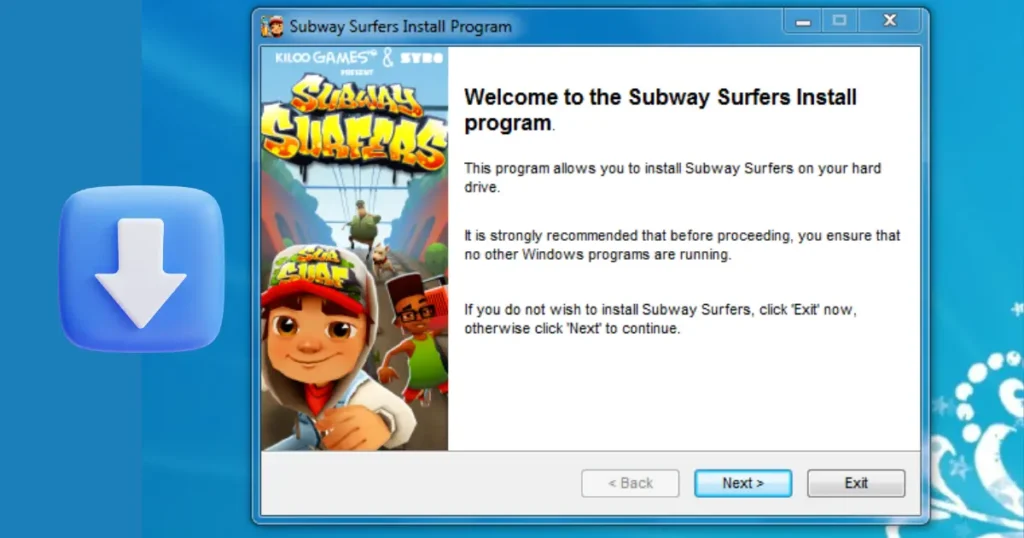
- Download GameLoop from its official website
- Install and launch the application
- Open the Game Center from the main screen
- Search for “Subway Surfers”
- Click Download and wait for installation
- Launch the game directly from GameLoop
Why GameLoop works great for Subway Surfers:
- Optimized rendering engine designed for gaming
- Auto-configures keyboard controls for endless runner games
- Lightweight on system resources compared to other emulators
- Regular updates keep the emulator compatible with the latest game versions
How to Play Subway Surfers on PC With Mod APK (Unlimited Coins & Keys)
This is where HappyMod WS gives you an edge that official sources can’t.
Instead of grinding coins for hours, the Subway Surfers Mod APK gives you:
- Unlimited coins and keys from the start
- All characters and hoverboards unlocked
- Ad-free gameplay experience
- Unlimited score multiplier boosters
- No in-app purchases required
How to install Subway Surfers Mod APK on PC via BlueStacks:
- Download the Subway Surfers Mod APK file from HappyMod WS
- Open BlueStacks on your PC
- Drag and drop the APK file directly into the BlueStacks window
- BlueStacks will automatically install the Mod APK
- Open the game and enjoy all unlocked features
Subway Surfers PC Keyboard Controls (BlueStacks & GameLoop)
Once you’re set up, here are the default keyboard controls for playing Subway Surfers on PC:
| Action | BlueStacks Key | GameLoop Key |
| Move Left | Left Arrow / A | Left Arrow |
| Move Right | Right Arrow / D | Right Arrow |
| Jump | Up Arrow / W | Up Arrow |
| Roll/Slide | Down Arrow / S | Down Arrow |
| Use Hoverboard | Space | Space |
You can customize these in the emulator’s key-mapping settings to whatever feels most comfortable.
Tips to Get a High Score in Subway Surfers on PC
Playing on PC gives you a significant advantage over mobile. Use these tips to maximize your score:
1. Focus on the Score Multiplier first: Collect all the letters in “SUBWAY” to increase your score multiplier. With keyboard controls, collecting them is much easier than on mobile.
2. Upgrade your power-ups: Prioritize upgrading the Jetpack, Coin Magnet, and Score Booster. With Mod APK’s unlimited coins, you can max all of them instantly.
3. Use hoverboards as backup lives: Activate a hoverboard before a risky section. It absorbs one crash, keeping your run alive.
4. Master keyboard reactions: The biggest advantage of PC gaming – you can react to obstacles faster with keyboard keys than by swiping on a phone screen.
5. Play during World Tour events: Subway Surfers regularly updates its World Tour locations (Tokyo, New York, Paris, etc.). Each location brings new missions that offer bonus rewards.
Frequently Asked Questions (FAQs)
1. Can I download Subway Surfers on PC for free?
Yes. Using BlueStacks or GameLoop emulators, you can download and play Subway Surfers on PC completely free via the Google Play Store.
2. Is there a Subway Surfers .exe file for Windows?
No. Any website offering a standalone Subway Surfers .exe file is likely distributing malware. The only safe way to play on PC is through a trusted Android emulator.
3. Which emulator is best for Subway Surfers on PC?
BlueStacks is best for most users due to its ease of use and HD graphics support. GameLoop is better for users on lower-end PCs who want gaming-optimized performance.
4. How do I get unlimited coins in Subway Surfers on PC?
Download the Subway Surfers Mod APK from HappyMod and install it through BlueStacks. The mod comes with unlimited coins, keys, and all characters unlocked.
5. Can Subway Surfers run on Windows 7?
Yes, but performance will be limited. Windows 10 or 11 with at least 4GB of RAM is recommended for a smooth experience.
6. Do Subway Surfers work offline on PC?
Yes. Subway Surfers can be played offline once installed through an emulator. An internet connection is only needed for leaderboard access and in-game purchases.
7. Is using a Mod APK for Subway Surfers safe?
When downloaded from trusted sources like HappyMod, Mod APKs are regularly tested for safety. Always avoid random third-party sites and scan files before installing.
8. What is the latest version of Subway Surfers for PC in 2025?
The game updates frequently. Visit HappyMod to find the latest Subway Surfers Mod APK version available for PC via emulator.
Final Thoughts
Playing Subway Surfers on PC is not only possible, it’s actually a better experience than playing on mobile. With keyboard controls, a bigger display, and the option to use the Mod APK for unlimited resources, you get the most out of this classic endless runner.
Whether you go with BlueStacks for its beginner-friendly setup or GameLoop for gaming-focused performance, getting Subway Surfers running on your Windows PC takes less than 10 minutes.
For the latest Subway Surfers Mod APK download and more Android gaming guides, explore HappyMod.ws, your go-to source for safe, updated, and tested mod files.