CapCut User Guide: Simple Steps for Beginners
CapCut has quickly developed to be one of the primary video editing applications used by creators on TikTok, YouTube, Instagram, and Reels. This CapCut user guide helps beginners understand how…
CapCut has quickly developed to be one of the primary video editing applications used by creators on TikTok, YouTube, Instagram, and Reels. This CapCut user guide helps beginners understand how to create professional edits, trending videos, and lyric-style content with ease. The app is popular for its simplicity, speed, and powerful editing tools.
The guide will cover all the steps from installing the application on all devices, including Mac, PC, Android, and iOS, to the final video editing features, such as music addition, the use of video editing templates, watermark removing, and video screen effects.
What Is CapCut? What Does CapCut Do?
CapCut is a free video editing app designed for both beginners and experienced editors. In this CapCut user guide, you’ll learn how users can crop, trim, and enhance videos using effects, transitions, and overlays. CapCut also allows you to add text, auto-captions, subtitles, voiceovers, and sound effects.
Users can export videos in HD and 4K, making CapCut an excellent tool for social media creators. Whether you want to make simple clips or complex cinematic edits, this CapCut user guide shows how CapCut makes professional video editing accessible to everyone.
Social media users want their videos to look polished and engaging, and CapCut delivers exactly that. With its powerful tools, users can easily create high-quality videos that stand out on platforms like TikTok, Instagram Reels, and YouTube Shorts.
Is CapCut Free? Do You Have to Pay for CapCut?
Free: Most editing tools cost nothing.
Optional Upgrades:
- CapCut Pro: Includes new effects, additional storage, and tools for removing the brand watermark.
- Locked assets in premium templates.
Cost: Pro typically costs a few dollars a month, depending on where you live.
Safety: CapCut is safe for people of all ages, including teens and younger kids (when used under supervision). CapCut features:
- No viruses, malware, or harmful content.
- Strong privacy.
- CapCut can be used in classrooms or at home.
Is CapCut Safe? Is CapCut Safe for 11-Year-Olds?
Yes, CapCut is safe for children, including 11-year-olds, when used under parental supervision. This CapCut user guide recommends supervision to ensure responsible and safe usage, especially for younger users.
How to Download CapCut: Android, PC, and Mac Guide
Downloading CapCut is simple. Android users can download it from the Google Play Store, while iOS users can download it from the App Store. For Windows users, CapCut is in the Microsoft Store, and Mac users can download it from the Mac App Store. CapCut also has some additional features and exclusive premium templates in CapCut APK Premium Unlocked, which you can download from trusted sites such as HappyMod WS. CapCut is completely functional on PC and Mac, so that users can edit videos on any device.
Step-by-Step CapCut User Guide for Beginners
- Start CapCut and tap on New Project.
- Add your photos or videos.
- Split and trim your clips as needed.
- Include transitions to smooth your edits.
- Add text and subtitles (you can animate them!).
- Include your own music or select music/sound effects from the library.
- Add effects and filters, and do some color grading.
- Use trending edits by applying templates.
- Use motion blur and keyframes to create your own effects.
- If you want, remove the watermark.
- Double-check your edits by previewing the video.
- Finally, choose to export the video in 4K or HD.
Tip: Following this guide in this order can help beginners create edits that look professional.
Check this out: https://www.youtube.com/watch?v=pHMoPh6mzm4&t=33s
How to Add Music in CapCut
You can choose from the music in CapCut or import your own. To import your own music, click Audio, choose Device Sounds, and choose Import. To use music from Spotify or other apps, you will need to download the music, or else you may get copyrighted. Using your own music will help fight copyright issues, especially on YouTube and TikTok. Using music will help your edits have an emotional impact and hit with the rhythm.
How to Make a Video on CapCut
Regardless of whether you are creating a vlog, montage, or aesthetic video:
How to Make Edits on CapCut
- Import clips.
- Cut relevant parts.
- Add video transitions.
- Insert audio.
- Add effects, text, and filters.
How to Make Good Edits on CapCut
Use:
- Beat Sync
- Motion Blur
- Keyframes
- Layering effects
- Color Grading
How to Make a Lyric Video on CapCut
- Add your audio.
- Insert text.
- Add auto captions.
- Animate lyrics.
How to Use CapCut Templates
CapCut templates make some editing tasks easier with preset designs, layouts, and effects. To access a template, click the Link to the template in the app, select Use this template, then add your media and export the video. Templates are ideal for making trending videos on TikTok or Instagram Reels, and for editing videos professionally without having to do a lot of editing. Templates are a good way for beginners to learn editing by showcasing automation, effects, and transitions.
How to Remove the CapCut Watermark
You can remove or adjust most watermarks in various locations on CapCut. To disable the watermark on your PC or mobile, go to Settings, then Watermark, and disable the toggle. When using templates, you can keep your video professional and clean by selecting the option “Export Without Watermark.” For TikTok videos that you edit in CapCut, you can eliminate the watermark by cropping, using a sticker to cover it, or using the smart remove tool. Professional content creators trim or edit watermarks to maintain a clean look.
Advanced Tools Explained in This CapCut User Guide
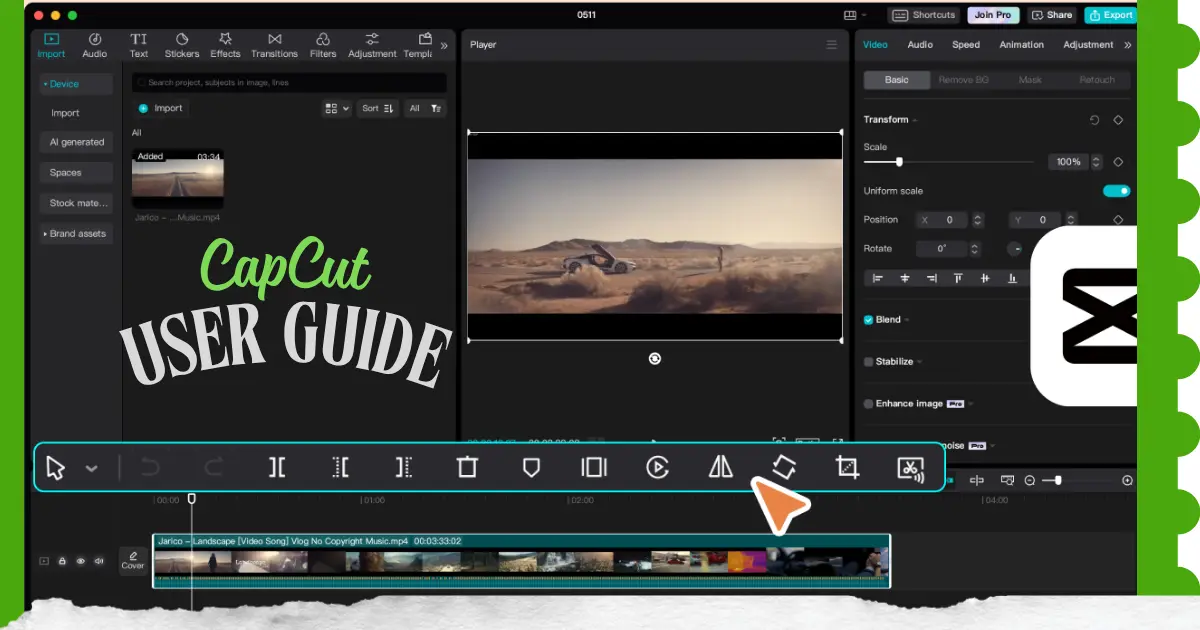
With CapCut, the user has access to a variety of advanced tools that promote high levels of creativity. Cropping can be accomplished on the timeline and in the Edit menu. Faces and objects can be blurred through the Effects, Mask, and Track Face. Videos can be reversed and green-screened, using the Overlay, Cutout, and Chroma Key. The Auto Cutout AI tool removes the background of videos with little to no effort. When combined with keyframes and motion blur, all these tools grant editors the ability to create visual texts that are cinematic and compelling and that are more likely to stand out on social media.
How to Post or Export a Video on CapCut
Once you have finished editing your video, click the Export button located in the top-right corner of the screen. CapCut allows you to export videos in resolutions up to 4K, giving you flexibility based on your quality and file size requirements. Before exporting, you can customize several settings, including the video resolution (480p, 720p, 1080p, 2K, or 4K), frame rate (24, 25, 30, 50, or 60 FPS), and Smart HDR, which can automatically enhance your video by converting it into a smarter HDR format for improved visual quality.
CapCut vs Alternatives: What to Use Instead of CapCut?
If CapCut is not available, use:
- VN Video Editor
- Alight Motion
- Kinemaster
- InShot
- Adobe Premiere Rush
Is TikTok and CapCut Getting Banned Again?
Some places are contemplating using restrictions, but CapCut is still available to use worldwide.
Frequently Asked Questions (FAQs)
1. What is the purpose of using CapCut?
The purpose of using CapCut is to create professional-quality videos easily. This CapCut user guide explains how users can edit short videos, vlogs, montages, and lyric videos by adding music, effects, transitions, and text.
2. Is CapCut free to use?
CapCut is free to use, and most of the features are accessible without paying; however, there is something called CapCut Pro, which you would have to pay for, and it includes extra effects and cloud storage.
3. Is CapCut safe?
According to this CapCut user guide, you can download CapCut from the Google Play Store, App Store, Microsoft Store, Mac App Store, or trusted APK websites like HappyMod.ws.
4. Does CapCut work on PC and Mac?
CapCut can be used on Windows and Mac computers because there are CapCut desktop applications that can be downloaded.
5. How do I download CapCut?
CapCut can be downloaded by going to the Google Play Store, App Store, Microsoft Store, Mac App Store, or downloading via a trusted APK website like Happymod WS.
6. How do I add music to CapCut?
This CapCut user guide explains that you can add music by using CapCut’s built-in audio library or importing your own files. Go to Audio → Device Sounds → Import to add downloaded music and avoid copyright issues on YouTube and TikTok.
7. Can I use CapCut music on YouTube?
According to this CapCut user guide, you should only use royalty-free or properly licensed music when uploading videos to YouTube to prevent copyright claims or monetization issues.
8. How do I remove the CapCut watermark?
You can go to Settings, then Watermark, and then turn it off. You can also select Export Without Watermark for templates.
9. How do I use CapCut templates?
To use templates, open the template and select Use Template. Add your media and then export the video.
10. What are the 12 basic steps of editing?
Some basic steps of editing include creating a project, importing clips, trimming clips, adding transitions, adding text, inserting music, applying effects, using templates, adjusting keyframes, previewing, and exporting.
11. How to use the CapCut step-by-step PDF?
You can download the PDF guides for CapCut that are available online to use the instructions offline.
12. How to use the CapCut template step by step?
To use a template, open it, upload your media, edit your content, and export the final video.
13. What are the 7 laws of editing?
The laws of editing that are most important include continuity, rhythm, pacing, clarity, consistency, matching action, and narrative logic.
14. What are the 5 stages of video editing?
The five stages of video editing are preparation, creating a rough cut, creating a fine cut, adjusting the color, and final export.
15. What are the 4 C’s of editing?
Continuity, clarity, coherence, and contrast make your videos look a lot more professional.
16. What is the 80/20 rule in video editing?
Concentrate on the 20% of the material that holds 80% of the audience’s interest.
17. How many hours to edit a 2-minute video?
Beginners take 1 to 3 hours, while experienced editors do it in less than an hour.
18. What is the 321 rule of editing?
Cuts on 3 beats, 2 frames for smooth transitions, and 1 frame for emphasis.